Artificial intelligence is changing how people search for products, services, and businesses. Instead of visiting multiple websites or searching through traditional search engines, people are increasingly using AI tools like ChatGPT to find information, compare services, and make business decisions.
To support this change, OpenAI introduced Businesses in ChatGPT, along with a new platform called Business Hub.
Business Hub allows eligible businesses to claim their business profiles, manage their information, share product details, and understand how customers discover them through ChatGPT.
This creates a new opportunity for businesses to improve the accuracy of their information and participate in AI-powered customer discovery.
In this guide, we will explain how to register your business on ChatGPT, what information you need, how the verification process works, and how claiming your business can help your company grow.
What Is Business Registration on ChatGPT?
Registering a business on ChatGPT means claiming or adding your business profile through OpenAI’s Business Hub.
It allows business owners or authorized representatives to manage important business information, including:
Business name and website.
Business description.
Products and services.
Business category.
Company logo and cover image.
Product pricing and availability, where supported.
Delivery and return policies, where applicable.
Once your business claim and required verification are approved, you can manage the information associated with your business profile.
ChatGPT may use this information when responding to relevant customer questions.
Important: Claiming a business does not guarantee higher rankings, recommendations, or increased sales. ChatGPT continues to make independent recommendations based on relevant information and other available sources.
Why Should You Register Your Business on ChatGPT?
Customers are adopting AI-powered tools to research businesses and make purchasing decisions. Having accurate business information available through ChatGPT can help businesses participate in this changing discovery experience.
Here are some important benefits:
1. Improve Your Business Discovery:
When customers ask ChatGPT questions about products, services, or businesses, ChatGPT may show relevant business information.
For example, a customer might ask:
Which CRM implementation company can help my business?
What are the best software development companies?
Which companies provide business automation services?
Where can I find a reliable digital marketing agency?
If your business is relevant to the question and appears in ChatGPT’s results, customers may discover your company.
2. Keep Your Business Information Updated:
Business Hub gives authorized business representatives a way to manage their business information.
You can update your website, description, products, services, categories, and other supported details.
This helps customers access more accurate information when researching your business.
3. Understand How Customers Discover Your Business
Business Hub provides aggregated insights that help businesses understand their presence on ChatGPT.
These insights include:
Business Mentions: Understand how often ChatGPT references your website or business listing.
Website Clicks: See how often users click through to your website.
Discovery Topics: Explore common topics associated with conversations in which your website is mentioned.
These insights can help businesses identify customer interests and improve their online information.
4. Improve Customer Engagement
Eligible businesses can use Business Agents to provide customers with another way to explore their products and services.
Customers can ask questions about offerings, product features, and policies through a conversation with the business agent.
This can help potential customers understand your services before contacting your sales team.
Business Agents are currently available to eligible ecommerce and online service businesses in the United States, subject to OpenAI’s requirements.
5. Share Product Information:
Businesses that sell products can connect an eligible product feed to share information such as:
Product names and descriptions.
Product prices.
Product availability.
Product URLs.
This helps customers explore product information through ChatGPT.
6. Build Trust Through Verified Business Information
After completing the required business claim and identity verification, eligible business profiles can display a blue verified checkmark.
This helps users identify business profiles that have completed OpenAI’s verification process.
Remember that verification confirms the business identity or authorization requirements; it does not guarantee that ChatGPT will recommend the company.
How to Register Your Business on ChatGPT: Step-by-Step Guide
Follow these steps to claim your business through OpenAI Business Hub.
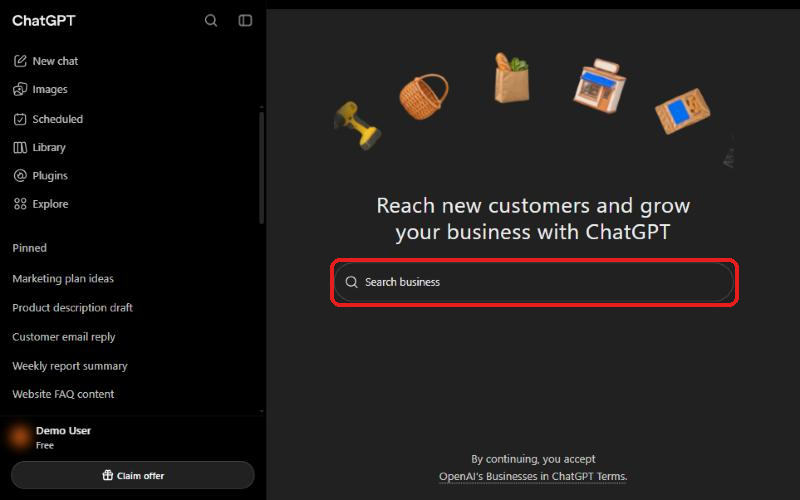
Step 1: Open ChatGPT Business Hub
First, visit ChatGPT and sign in using the account you want to use to manage your business.
Business Hub is the platform where eligible businesses can claim and manage their profiles.
ChatGPT Business Hub home screen with the “Search business” box.
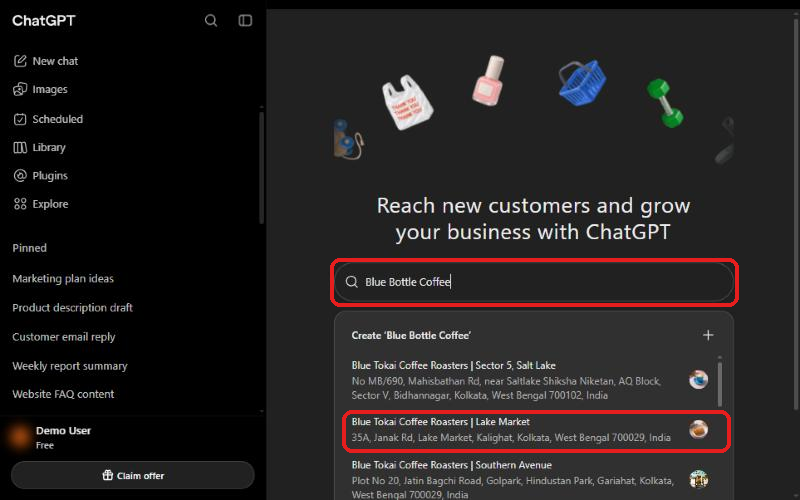
Step 2: Search for Your Business
Once you open Business Hub:
Go to the Business section.
Search for your company using its business name.
Check whether an existing business listing appears.
Select the listing that matches your company.
If your business is not listed, check whether Business Hub offers an option to add a new profile. This option depends on your business type and eligibility.
Do not create duplicate listings for an existing business.
Search results in Business Hub. Select the listing that matches your business, or use the “Create” option if it is not listed.
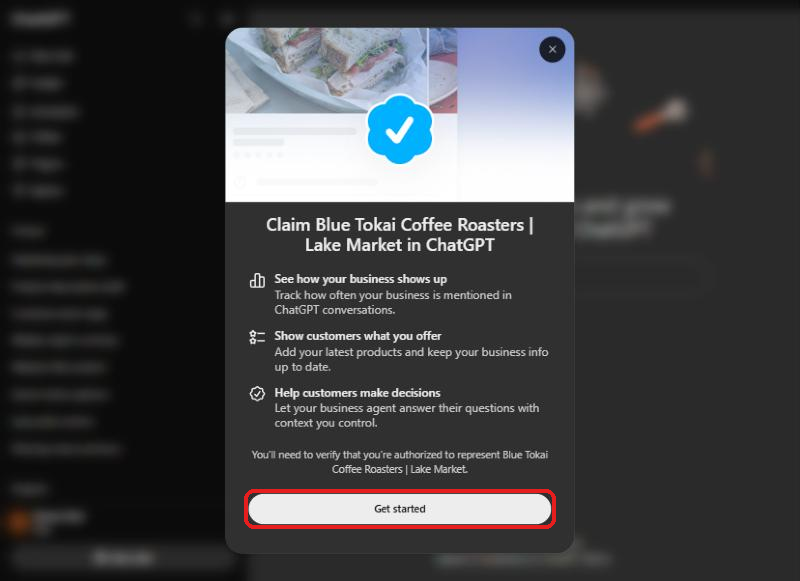
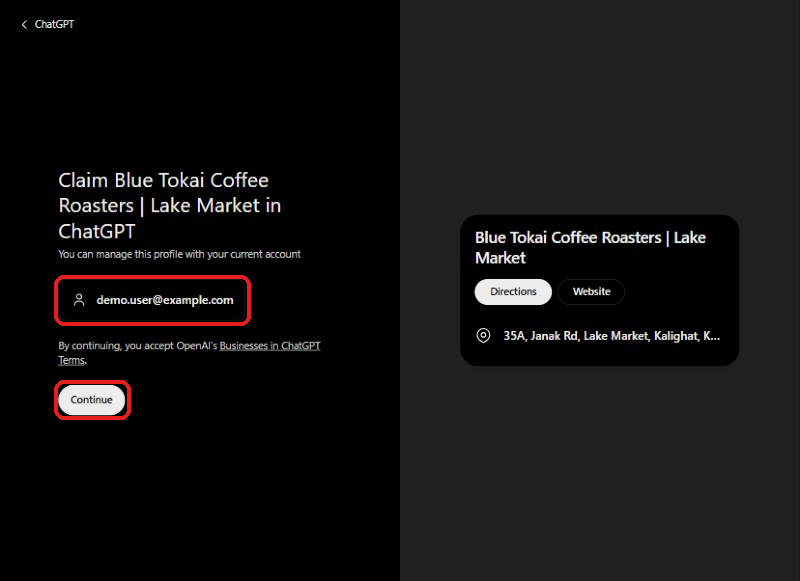
Step 3: Select Your Business and Confirm Your Account
After finding the correct listing:
Select your business.
Confirm that you are using the correct ChatGPT account.
Confirm your authority to represent the business.
Continue with the available verification options.
You must own the business or have permission to manage it.
The “Claim [business] in ChatGPT” screen. Click “Get started” to begin your claim.
Confirm the ChatGPT account that will manage the business profile, then click “Continue”.
Step 4: Verify Your Business Ownership
OpenAI may offer different verification methods depending on your business listing.
Common verification methods include:
Business Phone Verification
Select the business phone verification option.
Choose SMS or an automated phone call if available.
Receive your verification code.
Enter the code to confirm your connection to the business.
Business Email Verification
Select business email verification.
Receive a verification code at the registered business email address.
Enter the code to continue.
Website Domain Verification
Select website domain verification.
Copy the DNS TXT record provided by ChatGPT.
Open your domain’s DNS management panel.
Add the TXT record exactly as provided.
Return to ChatGPT and complete domain verification.
Shopify Store Verification
Eligible Shopify merchants may connect their Shopify store and follow the authorization instructions.
The available verification options may vary between businesses.
Step 5: Wait for Business Claim Approval
After submitting your verification details, OpenAI reviews your claim.
You may receive an email confirming approval or requesting additional information.
Once approved, you can access your claimed business profile in Business Hub.
Step 6: Complete Identity Verification
Business claim verification and personal identity verification are separate processes.
OpenAI uses Persona for identity verification.
To complete this process:
Open your claimed business profile.
Find the identity verification option.
Select Complete Verification with Persona.
Follow the instructions.
Submit the required information and documents.
Wait for approval.
Depending on your situation, you may need a government-issued ID, business registration information, and proof that you are authorized to represent the business.
Completing this verification is required for features such as publishing business information changes and accessing business insights.
Step 7: Update Your Business Profile
After the required approvals, open your business profile and review the available information.
Add or update:
Official business name.
Website URL.
Business description.
Products and services.
Business category.
Company logo.
Cover image.
Delivery and return policies, where applicable.
Make sure that all information is accurate, professional, and consistent with your official business records.
Step 8: Connect Your Product Feed (For Ecommerce Businesses)
If your business sells products online, you may be able to connect a product feed.
You can upload an eligible CSV product feed or use a supported hosted feed.
Include accurate product information, pricing, availability, and product URLs.
This helps ChatGPT access updated product information when users explore relevant products.
Step 9: Explore Your Business Insights
Once the required verification is approved, visit the Insights section in Business Hub.
Review your business mentions, website clicks, and discovery topics.
Use these insights to understand how people engage with your business on ChatGPT and identify opportunities to improve your business information.
Note: The insights are aggregated. Businesses do not receive individual customer prompts or private ChatGPT conversations.
What Information Do You Need Before Registering?
Preparing your business information before starting can make the process easier.
Here is a useful checklist:
Official business name.
Company website.
Business email address.
Business phone number.
Business registration documents, if requested.
Government-issued identification, if requested.
Proof of authority to represent the company.
Website domain and access to DNS settings, if using domain verification.
Company logo and business description.
Product information, if applicable.
Ensure that the details you submit match your official business records.
Who Can Register a Business on ChatGPT?
Eligible businesses can claim their profiles in locations where ChatGPT is available, subject to OpenAI’s verification and business eligibility requirements.
Examples include:
Software development companies.
IT consulting companies.
SaaS businesses.
Ecommerce companies.
Digital marketing agencies.
Online service providers.
Other eligible businesses.
However, some features have additional restrictions.
For example, Business Agents are currently limited to eligible ecommerce and online service businesses in the United States. Local stores and restaurants currently have more limited claiming availability.
Businesses should check the latest OpenAI eligibility requirements before starting.
Common Problems During Business Registration:
You may face a few issues while claiming your business.
1. Business Not Found
Check the company name and website. If an eligible online business is not listed, see whether the option to add a business is available.
2. Verification Code Not Received
Check whether the phone number or email address displayed is correct. Try another verification method if Business Hub offers one.
3. Website Domain Verification Failed
Check that the DNS TXT record matches the details provided by ChatGPT. DNS changes may take time to become available.
4. Business Already Claimed
If another person has claimed the profile, use the Dispute Ownership option and follow OpenAI’s verification instructions.
5. Identity Verification Pending
Wait for OpenAI’s review and check your registered email for updates or requests for additional information.
6. Business Agent Option Not Available
Your business may not meet the location, industry, or other eligibility requirements. Claiming a business does not automatically make it eligible for a Business Agent.
Best Practices After Registering Your Business on ChatGPT:
Claiming your business is only the first step. To make the most of your profile:
Keep your company information accurate and updated.
Use a clear and professional business description.
Provide detailed information about your products and services.
Keep your website content updated.
Maintain consistent company information across your website and other public platforms.
Add accurate product details and pricing where applicable.
Review your Business Hub insights regularly.
Follow OpenAI’s business and commerce policies.
These practices help maintain reliable business information and improve the overall customer discovery experience.
Frequently Asked Questions (FAQs):
Q1. Is registering a business on ChatGPT free?
OpenAI’s business claiming process is separate from advertising and does not require an Ads account or ChatGPT Enterprise agreement for eligible businesses. Check the latest Business Hub terms for any applicable requirements.
Q2. Does registering my business guarantee that ChatGPT will recommend it?
No. Claiming your business allows you to manage your information, but ChatGPT makes independent recommendations. There is no guarantee of higher visibility or sales.
Q3. Can I register my business on ChatGPT without a website?
OpenAI’s initial business claiming availability is focused on eligible businesses with a website. Check Business Hub for the requirements applicable to your business.
Q4. Can businesses in India register on ChatGPT?
Eligible businesses can claim their profiles in locations where ChatGPT is available, subject to business type, listing availability, and verification requirements. However, certain features, including Business Agents, currently have US-specific eligibility requirements. Local stores and restaurants also have more limited claiming availability.
Q5. How long does business verification take?
The review time can vary. OpenAI reviews submitted claims and sends an email when a decision is made or additional information is required.
Q6. Can I update my business details after registration?
Yes. After the required claim and identity verification approvals, you can manage supported business information through Business Hub. Changes may take time to appear.
Q7. What is a business agent in ChatGPT?
A business agent is a customer-facing AI experience that allows customers to ask questions about an eligible business’s products, services, and policies.
Q8. Will registering my business increase website traffic?
It may create additional opportunities for discovery and website clicks. However, increased traffic is not guaranteed. Business Hub provides insights into mentions and website clicks so you can measure available activity.
Conclusion:
AI-powered search is creating new opportunities for businesses to connect with potential customers.
OpenAI Business Hub gives eligible businesses a way to claim their profiles, provide accurate information, manage product details, and understand how customers discover them through ChatGPT.
Registering your business is a useful step towards participating in the changing AI-powered business discovery landscape. However, businesses should also maintain a strong website, publish useful content, and keep their online information accurate.
Want to strengthen your business’s digital presence and prepare for the AI-driven future?
At Variance Infotech, we help businesses explore digital transformation through software development, CRM implementation, business automation, and technology solutions.
Urvi is a marketing strategist at Variance Infotech, specializing in promoting the company's expertise in mobile app development and CRM solutions, including SuiteCRM and Salesforce, across various industries. With a focus on helping businesses enhance their digital presence, she plays a key role in driving growth and innovation, making a significant impact on the global digital landscape.




 Please wait...
Leave a Reply